> ## Documentation Index
> Fetch the complete documentation index at: https://docs.moralis.com/llms.txt
> Use this file to discover all available pages before exploring further.
# Tutorial
> Step-by-step guide to installing and using Moralis Onchain Skills with your AI agent.
## Video Tutorial
Watch the full walkthrough on setting up and using Onchain Skills to build Web3 apps with AI:
***
## Prerequisites
* **Node.js** installed on your machine
* A **Moralis API key** — get one free at [admin.moralis.com](https://admin.moralis.com/register)
* An AI agent that supports the [Agent Skills](https://skills.sh/) standard (e.g., Claude Code, Cursor, Windsurf, GitHub Copilot, Cline, Codex, Gemini)
***
## Step 1: Install Onchain Skills
Run the following command in your project directory:
```bash theme={null}
npx skills add novnski/onchain-skills
```
This installs three skills into your project:
* **moralis-data-api** — query blockchain data (136 endpoints)
* **moralis-streams-api** — real-time event monitoring (20 endpoints)
* **learn-moralis** — general Moralis knowledge and routing
### Alternative Installation Methods
**Via [ClawHub](https://clawhub.ai/):**
```bash theme={null}
clawhub install moralis-data-api
clawhub install moralis-streams-api
clawhub install learn-moralis
```
**Via OpenClaw agent:** If you have an [OpenClaw](https://openclaw.ai/) agent running, ask it to search for and install the Moralis API skills from ClawHub.
***
## Step 2: Configure Your API Key
Add your Moralis API key to a `.env` file in your project root:
```bash theme={null}
echo "MORALIS_API_KEY=your_key_here" >> .env
```
Replace `your_key_here` with your actual API key from [admin.moralis.com](https://admin.moralis.com/register).
Without the API key, the skills cannot call the Moralis API on your behalf.
**For OpenClaw users**, add the key to the `env` section in `~/.openclaw/openclaw.json` instead:
```json theme={null}
{
"env": {
"MORALIS_API_KEY": "your_key_here"
}
}
```
***
## Step 3: Start Using Skills
Once installed and configured, you can prompt your AI agent with skill-specific commands. Prefix your prompt with the skill name to load it directly.
### Query Blockchain Data
```
/moralis-data-api Get the token balances of 0x1234...
```
```
/moralis-data-api What are the top trending tokens on Ethereum?
```
```
/moralis-data-api Get the NFT collections owned by 0x1234...
```
### Monitor Real-Time Events
```
/moralis-streams-api Create a stream to monitor all ERC20 transfers on Ethereum
```
```
/moralis-streams-api List all my active streams
```
### Ask General Questions
```
/learn-moralis What chains does Moralis support?
```
```
/learn-moralis Which API should I use for tracking wallet activity?
```
***
## What's Next?
* Explore the full list of available endpoints in the [Onchain Skills Overview](/data-api/onchain-skills/overview)
* Browse the [EVM API](/data-api/evm) and [Solana API](/data-api/solana) documentation for detailed endpoint references
* Check out the [GitHub repository](https://github.com/novnski/onchain-skills) for source code and contributions
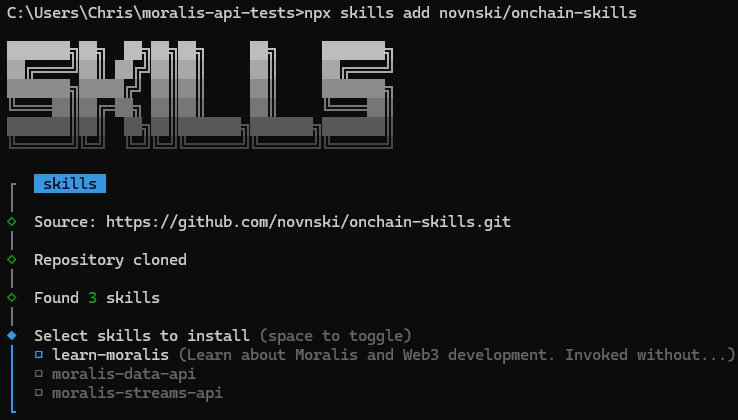 This installs three skills into your project:
* **moralis-data-api** — query blockchain data (136 endpoints)
* **moralis-streams-api** — real-time event monitoring (20 endpoints)
* **learn-moralis** — general Moralis knowledge and routing
### Alternative Installation Methods
**Via [ClawHub](https://clawhub.ai/):**
```bash theme={null}
clawhub install moralis-data-api
clawhub install moralis-streams-api
clawhub install learn-moralis
```
**Via OpenClaw agent:** If you have an [OpenClaw](https://openclaw.ai/) agent running, ask it to search for and install the Moralis API skills from ClawHub.
***
## Step 2: Configure Your API Key
Add your Moralis API key to a `.env` file in your project root:
```bash theme={null}
echo "MORALIS_API_KEY=your_key_here" >> .env
```
Replace `your_key_here` with your actual API key from [admin.moralis.com](https://admin.moralis.com/register).
This installs three skills into your project:
* **moralis-data-api** — query blockchain data (136 endpoints)
* **moralis-streams-api** — real-time event monitoring (20 endpoints)
* **learn-moralis** — general Moralis knowledge and routing
### Alternative Installation Methods
**Via [ClawHub](https://clawhub.ai/):**
```bash theme={null}
clawhub install moralis-data-api
clawhub install moralis-streams-api
clawhub install learn-moralis
```
**Via OpenClaw agent:** If you have an [OpenClaw](https://openclaw.ai/) agent running, ask it to search for and install the Moralis API skills from ClawHub.
***
## Step 2: Configure Your API Key
Add your Moralis API key to a `.env` file in your project root:
```bash theme={null}
echo "MORALIS_API_KEY=your_key_here" >> .env
```
Replace `your_key_here` with your actual API key from [admin.moralis.com](https://admin.moralis.com/register).